
Clean Image AI-Powered Photo Cleanup
Clean Image uses AI to remove text, logos, and objects from photos entirely within your browser for 100% private, instant cleanup.
Visit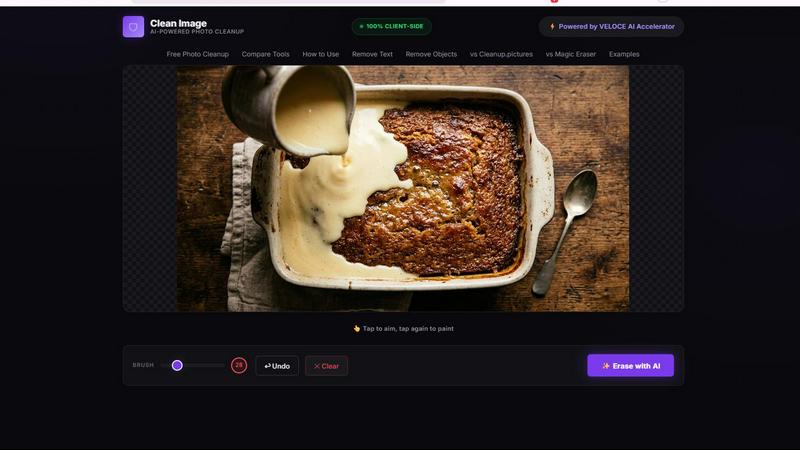
About Clean Image AI-Powered Photo Cleanup
Clean Image AI-Powered Photo Cleanup is a revolutionary browser-based tool that leverages advanced artificial intelligence to remove unwanted elements from your photos. Unlike traditional photo editing software that requires expensive subscriptions, complex workflows, or uploading sensitive images to external servers, Clean Image operates entirely within your web browser. This means every pixel of your image stays on your device, never transmitted over the internet. The tool is designed for anyone who needs to quickly clean up images: content creators removing watermarks, social media managers erasing timestamps, e-commerce sellers cleaning product photos, or casual users fixing personal pictures. At its core, Clean Image uses the powerful LaMa inpainting model, a state-of-the-art neural network specialized in reconstructing missing or removed areas of an image by intelligently analyzing surrounding pixels. This is combined with ONNX Runtime and WebAssembly to deliver high-performance AI processing directly in your browser without any server-side computation. The result is a tool that is fast, private, and completely free for personal projects. The user interface is elegantly simple: you drop an image, use a brush to paint over the elements you want removed, and click a button to erase them. The AI then fills in those areas with contextually appropriate content, seamlessly blending the repair with the original image. Best results are achieved on images with clean backgrounds containing text overlays, logos, date stamps, watermarks, or small blemishes. Clean Image represents a new paradigm in accessible, privacy-respecting AI tools where powerful technology meets user-friendly design without any compromises on security or performance.
Features of Clean Image AI-Powered Photo Cleanup
100% Client-Side Privacy
All image processing is executed locally within your browser using ONNX Runtime Web and WebAssembly technology. This architecture guarantees that your images never leave your device, eliminating any risk of unauthorized access, data breaches, or privacy violations. There are no upload servers, no cloud processing, and no third-party storage. Every brush stroke and AI reconstruction happens entirely on your own hardware, making Clean Image ideal for handling sensitive or confidential visual content.
AI Inpainting with LaMa Neural Network
The tool is powered by the OpenCV LaMa neural network, a cutting-edge model specifically designed for image inpainting tasks. When you brush over an area and initiate the erase command, the AI analyzes the surrounding pixels, textures, colors, and patterns to reconstruct the masked region with remarkable accuracy. This deep learning approach enables Clean Image to intelligently fill in removed text, logos, or objects by generating content that matches the original image context, rather than simply blurring or cloning pixels.
Instant Performance After First Load
Clean Image requires a one-time download of the AI model, approximately 89 MB in size, which is then cached in your browser. After this initial load, the model is instantly available for all subsequent sessions. This means future visits to the tool require zero data usage and no waiting time for model downloads. The combination of browser caching and optimized WebAssembly execution ensures that the erase operation completes in seconds, providing a smooth and responsive user experience.
Simple Brush and Erase Workflow
The user interface is designed for maximum accessibility and minimal learning curve. You simply drop your image file onto the designated area, use an adjustable brush tool to paint over any unwanted elements such as text overlays, logos, timestamps, or small objects, and then click the Erase button. The AI processes your selection and instantly delivers the cleaned result. There are no layers, masks, or complex settings to navigate, making professional-grade photo cleanup available to anyone regardless of technical skill level.
Use Cases of Clean Image AI-Powered Photo Cleanup
Removing Watermarks and Logos from Images
Content creators, graphic designers, and marketers often need to remove watermarks or brand logos from stock photos, reference images, or client materials. Clean Image excels at this task by intelligently filling in the area where the watermark was placed. For images with clean backgrounds behind the logo, the AI reconstructs the original surface with high fidelity, producing a natural-looking result that can be used for presentations, mockups, or design inspiration boards without visible traces of the removed element.
Erasing Date Stamps and Timestamps from Photos
Many digital cameras and smartphones automatically embed date stamps or timestamps onto photos, which can be distracting for professional use or personal archiving. Clean Image allows users to quickly brush over these overlays and remove them cleanly. The AI analyzes the background texture and color behind the stamp, whether it is a solid color, a gradient, or a complex scene, and reconstructs the area seamlessly. This is particularly useful for digitizing old photographs or preparing images for printing.
Cleaning Product Photos for E-Commerce
Online sellers and e-commerce professionals frequently need to remove price tags, promotional stickers, or brand markings from product images. Clean Image provides a fast and effective solution for this workflow. By brushing over the unwanted text or labels, users can obtain clean product photos that present items in their original, unmarked state. The tool's ability to handle clean backgrounds makes it especially effective for studio-shot product images, resulting in polished visuals that improve listing quality.
Removing Unwanted Objects and Small Blemishes
Beyond text and logos, Clean Image can be used to eliminate small unwanted objects or blemishes from personal and professional photos. This includes removing stray hairs, dust spots, small scratches, or incidental objects that distract from the main subject. The AI inpainting model analyzes the surrounding area to reconstruct a natural-looking background. This feature is valuable for photographers retouching portraits, real estate agents cleaning up property photos, or anyone looking to perfect their images without using complex editing software.
Frequently Asked Questions
Is Clean Image really free to use?
Yes, Clean Image is completely free to use for personal projects. There are no hidden charges, subscription fees, or pay-per-use models. The tool is designed to be accessible to everyone. However, it is important to note that the service is intended for personal, non-commercial use. If you require commercial licensing or have high-volume professional needs, you should check the tool's terms of service or contact the developer for appropriate arrangements.
What types of images work best with Clean Image?
Clean Image performs best on images with clean, uniform backgrounds that contain text overlays, logos, date stamps, watermarks, or small blemishes. The AI inpainting model excels at reconstructing simple backgrounds such as solid colors, subtle gradients, or low-texture surfaces. Complex backgrounds with intricate patterns, fine details, or significant depth variation may produce less seamless results. For optimal outcomes, ensure the area you want to remove has sufficient surrounding context for the AI to analyze.
How does Clean Image ensure my privacy and data security?
Clean Image operates on a 100% client-side architecture. All image processing is performed locally within your browser using ONNX Runtime Web and WebAssembly. Your images are never uploaded to any server, transmitted over the internet, or stored on external infrastructure. No accounts or logins are required, which means no personal data is collected. The AI model itself is downloaded to your browser and runs entirely on your device, ensuring complete data sovereignty.
What file formats are supported and are there size limits?
Clean Image supports common image file formats including PNG, JPG, and WebP. These formats cover the vast majority of use cases for photo cleanup. While the tool does not specify explicit file size limits, extremely large images may take longer to process due to the computational demands of the AI model operating within browser constraints. For best performance, it is recommended to use images with reasonable dimensions and file sizes. The tool is optimized for typical web and social media resolution images.
Explore more in this category:
Similar to Clean Image AI-Powered Photo Cleanup

AI pet image generator with photo-to-pet and free credits

Chat with random strangers online for free on ChatIt.me. Enjoy safe, anonymous, and instant 1-on-1 conversations with people worldwide

For creators and marketers: Free browser-based animation generator creating After Effects-quality motion graphics, chat bubbles, and video overlays in

Fast, free, and privacy-first browser tool to convert, crop, resize, and compress images locally without server uploads.

AI-native presentation and visual content platform that turns prompts, documents, images, videos, and data into polished, shareable decks.

CachePlex is an all-in-one suite of 22+ professional web tools. From SEO audits and image compression to AI writing, get everything in one free place.

Free AI anime wallpaper generator. Create original HD anime wallpapers and avatars from text prompts.

AI-powered visa and passport photo maker that creates compliant photos with smart cropping, resizing, and validation.