
Draftsheet AI
Draftsheet AI automatically tracks lawyer work activity in real time to recover lost billable hours without capturing keystrokes or screenshots.
Visit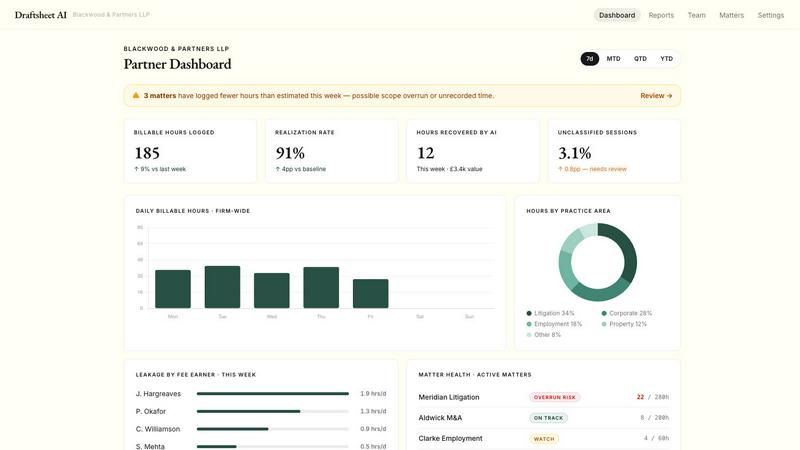
About Draftsheet AI
Draftsheet AI is an innovative, purpose-built time-tracking solution designed exclusively for law firms. It directly addresses the pervasive and costly problem of underbilling, where fee earners lose an average of 48 billable minutes per day due to cumbersome manual time logging. At a typical rate of £250 per hour, this translates to approximately £48,000 in lost revenue per fee earner each year. Draftsheet AI solves this by running silently in the background on each lawyer’s machine, monitoring active applications and document titles without interrupting their workflow. The system captures activity every few seconds, grouping it into sessions and using advanced AI to match work to clients and matters, assign billing codes, and draft detailed narratives. Lawyers only need to spend about 10 minutes at the end of each day reviewing and approving their pre-filled timesheet. The product is built end-to-end for legal billing, not as a generic tracker with a law firm skin. It offers a fee earner dashboard for individual review and a revenue reporting dashboard for firm-wide performance insights. Crucially, Draftsheet AI prioritizes security and privacy: it never captures keystrokes, screenshots, file contents, email body text, or full URLs. Encrypted activity logs and DPA compliance ensure that sensitive client information remains protected. This tool is ideal for solo practitioners and larger firms alike, helping them recover lost billable time, improve billing accuracy, and increase overall revenue.
Features of Draftsheet AI
Passive and Silent Time Capture
Draftsheet AI operates completely in the background on each fee earner’s desktop, eliminating the need for manual timers, forms, or any user interaction during the workday. The desktop agent captures the active application name, window and document title, browser tab title and domain, calendar event title and duration, and active or idle timestamps every few seconds. This passive approach ensures that lawyers can focus entirely on their legal work without being interrupted by time-tracking tasks. The system respects workflow by never requiring the user to start or stop timers, making time capture effortless and comprehensive.
AI-Powered Timesheet Generation
At the end of each day, a single click generates a complete timesheet. The AI groups captured activity into logical sessions, automatically matches them to the correct clients and matters, assigns appropriate billing codes, and writes professional narratives that describe the work performed. This dramatically reduces the time spent on administrative tasks from potentially hours to just 10 minutes of review. The AI model is personalized for each fee earner and improves over time by learning from every edit or correction made during the review process, becoming more accurate with each use.
Comprehensive Security and Privacy
Draftsheet AI is designed to watch the clock, not your content. The system has a strict data policy that defines exactly what is captured and what is never captured. It captures only application names, window titles, browser domains, and timestamps. It never captures keystrokes, typed text, screenshots, screen recordings, file or document contents, email body text, full URLs, query strings, or clipboard contents. All activity logs are encrypted, and the solution is DPA compliant as standard. This ensures that sensitive client information and confidential legal work remain completely secure and private.
Direct Billing System Integration
Draftsheet AI integrates directly with leading legal billing systems such as Clio, LEAP, and others. Approved timesheet entries can be pushed directly into these systems with a single action, eliminating the need for manual data entry or file exports. This seamless integration ensures that captured time flows directly into the firm’s billing workflow, reducing administrative overhead and the risk of transcription errors. The system also supports CSV and PDF export for firms using less common billing platforms.
Use Cases of Draftsheet AI
Recovering Lost Billable Time for Solo Practitioners
Solo practitioners often juggle multiple roles, from legal work to client management to business administration. This constant switching makes manual time tracking difficult and leads to significant underbilling. Draftsheet AI runs silently in the background on their single machine, capturing all billable activity throughout the day. The solo practitioner can review and approve their timesheet in under 10 minutes at the end of the day, ensuring every billable minute is captured. This directly translates to increased revenue without additional work hours, making the tool invaluable for sole practitioners who cannot afford to lose even a fraction of their billable time.
Improving Billing Accuracy for Mid-Sized Law Firms
Mid-sized law firms face the challenge of managing multiple fee earners across different practice areas, each with varying billing rates and client engagements. Draftsheet AI provides a firm-wide revenue reporting dashboard that gives practice managers real-time visibility into hours captured, approved, and exported per fee earner. The system also shows utilisation rates by fee earner and team, billed versus recorded time to identify leakage at a glance, and breakdowns by client and matter. This data allows firm leadership to identify underperforming areas, provide targeted training, and ensure that all billable work is accurately captured and billed, improving overall firm profitability.
Streamlining Time Capture for Busy Litigators
Litigators often work across multiple cases in a single day, switching between document drafting, court preparation, client calls, and research. Manually logging time for each discrete task is impractical and prone to error. Draftsheet AI captures activity from applications like Word, Outlook, iManage, and Chrome, automatically grouping related work into sessions. For example, time spent on a settlement document in Word and related emails in Outlook are intelligently combined into a single entry for that matter. The AI then drafts a narrative describing the work performed, such as "Reviewed and revised settlement terms for Mercer v. Halcyon matter." This allows litigators to focus on their cases while ensuring every minute of work is captured and billed correctly.
Enhancing Compliance and Audit Readiness
Law firms must maintain accurate and detailed time records for client billing, audit purposes, and potential fee disputes. Draftsheet AI creates a detailed, timestamped log of all work activities, providing a clear and defensible record of time spent on each matter. The system’s encrypted activity logs ensure data integrity and security. Because the system never captures sensitive content like document contents or keystrokes, it complies with strict data protection regulations while still providing the granularity needed for billing. This makes Draftsheet AI an essential tool for firms that prioritize compliance and need to demonstrate the accuracy and completeness of their time records.
Frequently Asked Questions
How does Draftsheet AI ensure client confidentiality and data security?
Draftsheet AI is built with a strict privacy-first design. The desktop agent captures only non-sensitive metadata: active application name, window and document title, browser tab title and domain, calendar event title and duration, and active or idle timestamps. It never captures keystrokes, typed text, screenshots, screen recordings, file or document contents, email body text, full URLs, query strings, or clipboard contents. All captured data is encrypted and the system is DPA compliant as standard. This ensures that no sensitive client information or confidential legal work is ever recorded or stored.
Does Draftsheet AI require manual timer start and stop?
No, Draftsheet AI is completely passive and requires no manual interaction during the workday. The desktop agent runs silently in the background, capturing activity every few seconds without any need for the user to start or stop timers. Lawyers can focus entirely on their legal work. At the end of the day, they simply click a button to generate a pre-filled timesheet, review the entries, and approve them. This eliminates the friction and distraction associated with traditional time-tracking tools.
How does the AI get better over time?
The AI model is personalized for each fee earner. Every time a user makes an edit during the review process, such as reassigning an entry to a different client or matter, correcting a billing code, or tweaking a narrative, the system learns from that correction. This feedback retrains the fee earner’s personal model, making future automatic assignments and narratives more accurate. Over time, the system becomes highly attuned to each lawyer’s specific practice areas, clients, and billing preferences, reducing the need for manual corrections.
What billing systems does Draftsheet AI integrate with?
Draftsheet AI integrates directly with leading legal billing and practice management systems including Clio and LEAP. Approved timesheet entries can be pushed directly into these systems with a single action, eliminating manual data entry. For firms using other billing platforms, the system also supports CSV and PDF export options. The integration capabilities are continuously expanding, and the product page provides a full list of supported systems. For firms with custom requirements, the export options provide a flexible workaround.
Similar to Draftsheet AI


SendNow helps teams securely share sensitive files, track engagement, and manage branded deal rooms. Control downloads, expiration, and viewer access.


US LLC and UK LTD formation for non-US/non-UK solo founders

Arceus Legal provides scalable AI-powered contract review, drafting, and negotiation with upfront pricing and fast turnarounds.

Commentari transforms community insights into impactful legal action documents, making civic engagement accessible and effective.