
JustPDF
JustPDF is a privacy-first browser toolkit with 17 free tools to edit, convert, and compress PDFs entirely on your device.
Visit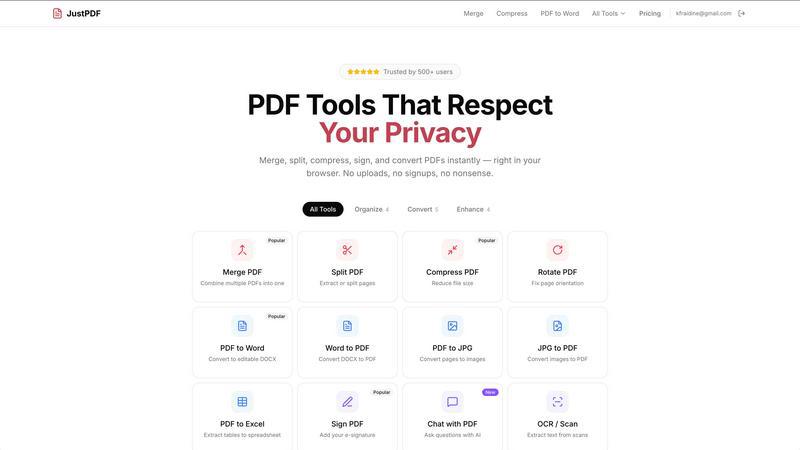
About JustPDF
JustPDF is a revolutionary suite of 17 professional-grade PDF tools that operates with a fundamental commitment to user privacy and security. Unlike traditional online PDF services such as Smallpdf or iLovePDF, which require uploading files to remote servers, JustPDF performs all processing entirely within the user's web browser. This is achieved through advanced JavaScript and WebAssembly technology, ensuring that sensitive documents—whether personal, financial, academic, or business-related—never leave the user's device. This local processing model is verifiable by users themselves via the browser's Developer Tools Network tab, providing transparent proof of its privacy-first architecture. The platform caters to a wide audience, including students, professionals, legal entities, and anyone handling confidential documents, by offering a comprehensive toolkit for organizing, converting, compressing, and editing PDFs. Its core value proposition is delivering powerful, desktop-level PDF functionality with the convenience of a web app, but without the security risks associated with cloud uploads. With a generous free tier and FERPA-compliant operations for educational use, JustPDF stands out as a fast, free, and fundamentally private solution for everyday and professional PDF tasks.
Features of JustPDF
100% Browser-Based Processing
The cornerstone feature of JustPDF is its complete local file processing. Every operation, from merging to OCR, is executed directly within your browser using client-side JavaScript and WebAssembly. This means your files are processed on your own computer or phone and are never transmitted to or stored on any external server. This architecture guarantees maximum privacy and security, making it ideal for handling sensitive documents where data sovereignty is paramount.
Comprehensive PDF Tool Suite
JustPDF offers a robust collection of 17 essential tools covering all major PDF manipulation needs. This includes core organization tools like Merge, Split, Compress, and Rotate, as well as advanced conversion tools for transforming PDFs to and from formats like Word, JPG, and Excel. Specialized tools such as Flatten PDF, Unlock PDF, Sign PDF, and converting WebP/HEIC images to PDF are also included, providing a one-stop solution for virtually any PDF task.
AI-Powered Chat with PDF
This innovative feature integrates artificial intelligence to allow users to interact with their PDF documents conversationally. Users can upload a PDF and ask the AI questions about its content, such as requesting summaries, extracting specific data, or clarifying concepts. This tool transforms static documents into interactive sources of information, significantly boosting productivity for research, study, or quick document analysis without manual reading.
Offline Functionality & No Account Required
JustPDF is designed for ultimate convenience and accessibility. Its browser-based engine allows most tools to function even without an active internet connection after the initial page load. Furthermore, users can immediately access the free tier without creating an account or providing any personal information. This eliminates signup barriers and protects user anonymity, allowing for quick, private document processing on the fly.
Use Cases of JustPDF
Handling Sensitive Legal or Business Documents
Lawyers, consultants, and business professionals often work with confidential contracts, financial reports, and strategic plans. Using JustPDF ensures these sensitive files are compressed, merged, signed, or converted without ever being exposed to third-party servers, maintaining attorney-client privilege and corporate data security throughout the document workflow.
Student and Academic Work
Students and researchers can safely compress lecture slides, merge research papers, convert assignments to PDF, or use the Chat with PDF AI to quickly study textbook content. JustPDF's FERPA compliance makes it a trustworthy tool for educational institutions, ensuring student record privacy is protected during all document processing activities.
Personal Document Management
For everyday users, JustPDF simplifies managing personal paperwork. This includes combining multiple scanned receipts into one file for expense reporting, rotating incorrectly scanned pages, converting a photographed document (JPG) into a proper PDF, or adding an e-signature to a rental agreement—all with the assurance that private personal data remains on the user's own device.
Preparing Files for Digital Submission
Whether applying for a job, submitting a proposal, or sending artwork to a printer, JustPDF helps prepare flawless documents. Users can compress large portfolio PDFs to meet email size limits, flatten forms to lock content, convert Word resumes to PDF format, or ensure images are in the correct PDF format, all while maintaining file integrity and privacy.
Frequently Asked Questions
How does JustPDF ensure my files are private?
JustPDF uses a client-side processing model. When you use a tool, the entire application, including the processing engine, runs in your browser via JavaScript and WebAssembly. Your PDF file is loaded into your computer's memory, processed locally, and the result is downloaded back to you. You can verify no data is uploaded by opening your browser's Developer Tools (F12), going to the Network tab, and confirming no external network requests containing your file data are made when you perform an operation.
What is the difference between the free and Pro plans?
The free plan allows users to perform up to 3 operations per day across all tools without any cost, account, or watermark. The Pro plan, starting at $4 per month, provides unlimited access to all 17 tools with no daily restrictions. Both plans operate on the same private, browser-based principle; Pro simply removes the usage limit for power users.
Can I use JustPDF offline?
Yes, to a significant extent. Since the core processing code is loaded into your browser, many of JustPDF's tools will continue to function even if you lose your internet connection after the initial website load. This makes it reliable for use in situations with unstable or no internet access. Some features that may require initial verification, like Pro status, might need a connection.
What does "FERPA-compliant" mean for JustPDF?
FERPA (Family Educational Rights and Privacy Act) is a US law that protects the privacy of student education records. JustPDF's compliance indicates that its architecture—where files never leave the user's browser or device—aligns with the stringent data protection requirements for handling student information. This makes it a safe and approved tool for use by teachers, administrators, and students within educational settings.
Pricing of JustPDF
JustPDF operates on a freemium model. The service offers a completely free tier that allows users to perform 3 operations per day across all 17 tools without requiring an account or leaving watermarks on outputs. For users with higher volume needs, the Pro subscription plan is available starting at $4 per month. The Pro plan provides unlimited access to all tools, removing the daily operation limit while maintaining the same high standards of privacy and browser-based processing.
Explore more in this category:
Similar to JustPDF

Apps and files on an infinite canvas where people and AI agents work together.

All-in-one POS, inventory, accounting and HR software for Bangladeshi SMEs — real-time sales, stock and finance in one place.

AI meeting notes, transcripts, summaries and action items on iPhone, iPad and Android.

ButterShare is a browser-based peer-to-peer file transfer tool that lets you send large files and folders directly between devices without signup or c

AI Email Filter sorts incoming mail into folders using plain-language prompts you write. Works with any IMAP mailbox; bring your own LLM if you want.

AI hiring platform to screen resumes, run 10-language voice interviews, and rank top talent automatically.

Free collection of online developer utilities, code formatters, and digital converters designed to streamline your daily workflow.

Discover 50,000+ ready-to-use AI prompts for text, image, and video generation. Save time and create better results with AI.