
ProcessSpy
ProcessSpy is an advanced process monitor for Mac that offers in-depth real-time monitoring and powerful filtering capabilities for system processes.
Visit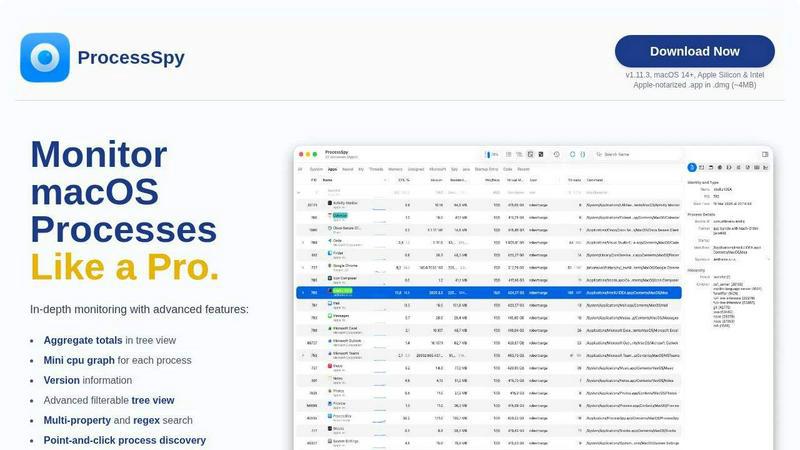
About ProcessSpy
ProcessSpy is an advanced process monitoring tool designed specifically for macOS, providing users with capabilities far beyond those offered by the standard Activity Monitor. It serves as a native alternative to Sysinternals Process Explorer, allowing users to gain deep insights into the processes running on their system. With features like visualizing process trees, inspecting open files, and viewing environment variables, ProcessSpy empowers developers and power users to manage their applications effectively. Its intuitive interface and fast performance leverage native macOS APIs, ensuring a seamless experience. Whether you are troubleshooting an unresponsive application or analyzing system performance, ProcessSpy offers the comprehensive monitoring tools you need to optimize your workflow and maintain system stability.
Features of ProcessSpy
Advanced Tree View
ProcessSpy features a sophisticated tree view that allows users to visualize process hierarchies easily. It includes real-time filtering and search capabilities, enabling users to see aggregate totals for CPU, Memory, and Threads. This feature is essential for developers managing multiple applications and helps in quickly identifying resource hogs.
Javascript Filters
With ProcessSpy, users can create complex filters using Javascript, which adds a powerful layer of customization to the monitoring experience. This feature allows for the specification of multiple conditions, making it easier to pinpoint specific processes that match intricate criteria.
Environment Variables (Paid Feature)
For users who require deeper insights into their applications, ProcessSpy provides the ability to view environment variables associated with processes. This paid feature is beneficial for developers needing to understand the context in which their applications are running.
Process History Recording (Paid Feature)
This feature allows ProcessSpy to record historical values for CPU, Memory, and Threads over time. Users can export these results to CSV for further analysis. This capability is particularly useful for performance monitoring and debugging, as it provides insights into how processes behave over time.
Use Cases of ProcessSpy
Application Development
Developers can leverage ProcessSpy to monitor their applications during development, providing critical information about command-line arguments, environment variables, and performance metrics. This insight is vital for debugging and optimizing code.
System Troubleshooting
When applications become unresponsive or behave unexpectedly, ProcessSpy can help identify the problematic processes. By providing detailed information, including open files and connections, users can quickly diagnose issues and take corrective action.
Performance Analysis
ProcessSpy's ability to visualize process trees and aggregate resource usage allows users to analyze system performance effectively. IT professionals can identify resource-intensive applications and take steps to optimize system performance.
Managing Multiple Java Applications
For developers running multiple Java applications with different JDK versions, ProcessSpy provides the necessary details such as version information and command-line paths, making it easier to distinguish between processes and manage resources effectively.
Frequently Asked Questions
Is ProcessSpy safe to install on my Mac?
Yes. ProcessSpy is Apple-notarized and packaged as a signed .app inside a .dmg. This ensures that it is verified and safe for use on both Intel and Apple Silicon Macs.
Does ProcessSpy support older versions of macOS?
ProcessSpy is specifically designed for macOS 14 and newer versions. Users on older macOS versions will not be able to install this application.
What is the license model for ProcessSpy?
The licensing model allows one user to install ProcessSpy on unlimited devices. The license includes lifetime updates and access to new features as they are developed.
How do I unlock paid features in ProcessSpy?
To unlock paid features, users can purchase a license on Gumroad for $24.99. This one-time payment provides lifetime updates and the ability to use features across multiple devices.
Similar to ProcessSpy

Provide AI-powered customer support widget for your website

A strictly human-verified software directory. Discover active SaaS apps, practical AI tools, and custom n8n workflows without bot-scraped spam.

From first scene to published 2D game, no code

The #1 Native Form Builder Plugin for Framer - No Code, No Embeds, No External Platforms.

Chat with random strangers online for free on ChatIt.me. Enjoy safe, anonymous, and instant 1-on-1 conversations with people worldwide

Fast, free, and privacy-first browser tool to convert, crop, resize, and compress images locally without server uploads.

A free launch checklist for SaaS, apps, AI tools and more. Every step says why it matters and when you can skip it.

ToolVerified is a hand-curated directory for discovering the best new software. We ban paid ads so you can find apps ranked purely by user upvotes.