
Prompt Builder
Prompt Builder simplifies AI prompt creation, enabling users to generate, refine, and manage tailored prompts for various models in seconds.
Visit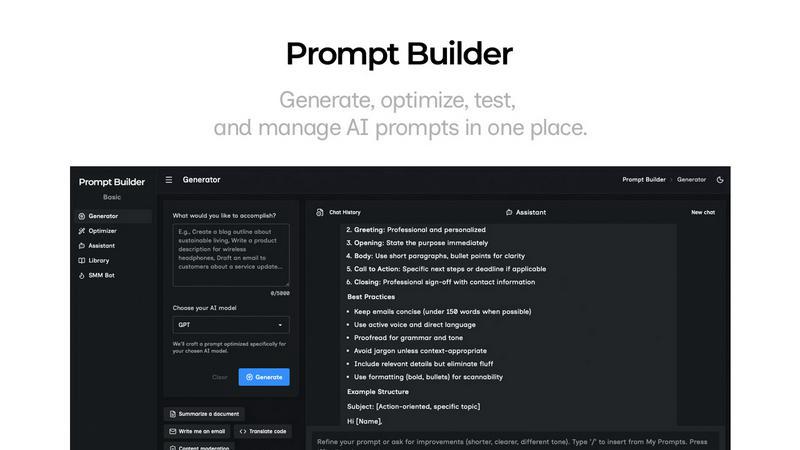
About Prompt Builder
Prompt Builder is an innovative workspace designed for prompt engineering, enabling users to write, test, and save prompts with ease. It is tailored for both beginners and experienced users who seek to create effective prompts that align with various AI models, including GPT, Claude, Gemini, Llama, Mistral, DeepSeek, Grok, and Perplexity. The platform allows users to start with a draft, engage in a chat for refinement, and organize their work by saving or pinning versions in a personal library. Its primary value proposition lies in streamlining the prompt creation process, eliminating the need for repetitive rewriting and providing quick access to reusable prompts. With features like an integrated Optimizer and a library of community-generated templates, Prompt Builder transforms ideas into ready-to-use prompts in seconds, enhancing productivity and creativity in AI interactions.
Features of Prompt Builder
Prompt Generator
The Prompt Generator allows users to describe their ideas and choose a target AI model, producing a professional-grade prompt that can be refined through an intuitive chat interface. This feature ensures that the generated prompts are tailored to the specifications of the selected model, providing a solid foundation for effective AI interactions.
Chat Refinement
With the Chat Refinement feature, users can quickly enhance their prompts in a built-in chat workspace. This capability enables fast iterations and adjustments, ensuring that the prompts are not only precise but also aligned with the intended output. The chat history feature allows users to revisit previous iterations for inspiration.
Prompt Optimizer
The Prompt Optimizer takes existing prompts and enhances them by improving clarity, constraints, and output formats. Users can paste their prompts into the Optimizer, which generates a clearer and more effective version in seconds. This feature is particularly useful for refining prompts that may not yield the desired results.
Prompt Library
The Prompt Library enables users to save, organize, and reuse their best prompts across different projects and use cases. It includes search and filter functionalities, allowing users to quickly locate specific prompts. Additionally, users can explore community prompts, adding favorites to their Library for future use, fostering collaboration and shared knowledge.
Use Cases of Prompt Builder
Content Creation
Content creators can utilize Prompt Builder to generate high-quality writing prompts tailored to various subjects and styles. By refining these prompts through chat, they can create engaging articles, blog posts, or social media content that resonates with their audience.
Marketing Campaigns
Marketers can leverage the platform to develop compelling copy and advertisements. With the ability to generate prompts specifically for different platforms like LinkedIn, Instagram, or TikTok, they can ensure their messaging is optimized for each audience, increasing engagement and conversion rates.
Educational Purposes
Educators can use Prompt Builder to create customized prompts for assignments or discussions. By refining the prompts, they can encourage critical thinking and creativity among students, enhancing the overall learning experience and facilitating more dynamic classroom interactions.
Software Development
Developers working on AI applications can benefit from the precise prompts generated for various models. Prompt Builder allows them to quickly create and test prompts that drive the desired responses from AI systems, streamlining the development process and improving product outcomes.
Frequently Asked Questions
What AI models does Prompt Builder support?
Prompt Builder is compatible with a variety of AI models, including GPT, Claude, Gemini, Llama, Mistral, DeepSeek, Grok, and Perplexity. This versatility allows users to create tailored prompts for their specific needs.
How does the Chat Refinement feature work?
The Chat Refinement feature enables users to engage in a conversational interface where they can iterate on their prompts quickly. Users can adjust wording, add constraints, and clarify intent, all while keeping track of their chat history for reference.
Can I share my prompts with others?
Yes, Prompt Builder includes a community library where users can explore and share prompts. This feature fosters collaboration and allows users to benefit from the creativity and insights of others in the community.
Is there a free trial available?
Prompt Builder offers a free trial that allows users to make 5 premium requests per month and 20 assistant requests without requiring a credit card. This enables potential users to explore the platform's capabilities before committing to a paid plan.
Similar to Prompt Builder

Apps and files on an infinite canvas where people and AI agents work together.

AI meeting notes, transcripts, summaries and action items on iPhone, iPad and Android.

Provide AI-powered customer support widget for your website


Free Online Screen Test Tool - Instantly diagnose dead pixels, lines, color issues, and flickering. Multiple test modes, no download needed.


