
QuickTextTools
QuickTextTools provides 76 free online utilities for writers and creators to streamline text processing and boost productivity effortlessly.
Visit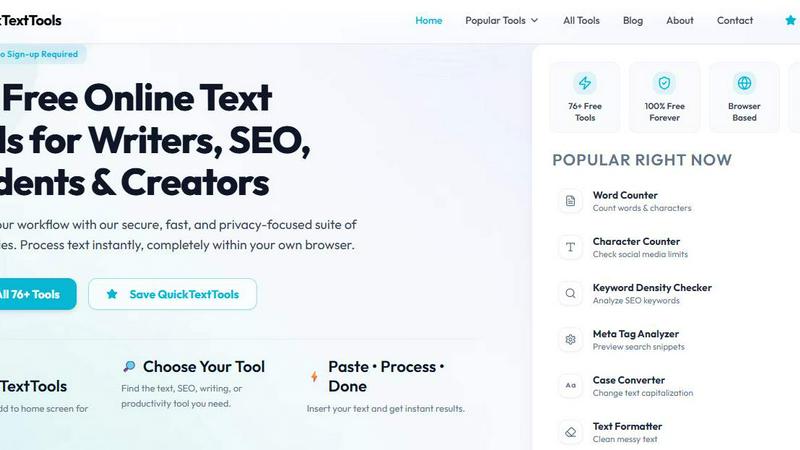
About QuickTextTools
QuickTextTools is a versatile, free online platform designed to cater to the needs of writers, marketers, developers, students, SEO professionals, and content creators. With over 76 browser-based tools, it enhances productivity by providing a comprehensive suite of utilities that streamline various tasks such as text formatting, SEO analysis, and content optimization. The platform is built with user experience in mind, allowing users to perform tasks directly in their web browser without the need for complicated setups or software downloads. QuickTextTools prioritizes privacy and security, ensuring a hassle-free experience. Whether you are cleaning up text, analyzing SEO meta tags, or managing keywords, QuickTextTools offers practical solutions that enable users to work smarter and more efficiently. Its user-friendly interface and instant processing capabilities make it a valuable resource for anyone looking to enhance their workflow and productivity.
Features of QuickTextTools
Extensive Tool Collection
QuickTextTools boasts over 76 free online utilities tailored for various tasks, including writing, SEO, and productivity. Users can quickly navigate through this diverse collection to find the tools that best suit their specific needs, enhancing efficiency and workflow.
Text Formatting Tools
The platform includes powerful text formatting utilities that allow users to clean up messy text, convert text case formatting, and remove unwanted characters. These tools ensure that content is polished and ready for presentation, saving time in the editing process.
SEO Analysis Utilities
QuickTextTools offers a range of SEO analysis tools, such as keyword density checkers and meta tag analyzers. These utilities enable users to optimize their content for search engines, improving visibility and engagement while ensuring that their writing is effective.
Writing Assistance Features
With tools designed to improve writing quality, such as word counters and reading time calculators, QuickTextTools assists users in refining their content. This helps writers gauge their work's readability and ensures they communicate their messages effectively.
Use Cases of QuickTextTools
Streamlining Content Creation
Writers can use QuickTextTools to streamline their content creation process by leveraging text formatting tools and writing assistants. These utilities enable them to produce high-quality drafts quickly, focusing on creativity rather than tedious formatting tasks.
Optimizing SEO Strategies
SEO professionals can benefit from QuickTextTools by utilizing the various analysis tools available. They can check keyword density, analyze meta tags, and generate SEO titles, ensuring that their content is optimized for search engine visibility and performance.
Enhancing Academic Work
Students can take advantage of the platform's text utilities to improve their academic writing. Tools like word counters and character counters help ensure that assignments meet specific requirements, while text cleaners assist in producing polished submissions.
Supporting Developers
Developers can utilize QuickTextTools for its developer utilities, such as JSON formatters and URL encoders. These tools aid in efficient coding and data formatting, making it easier to manage projects and collaborate on software development tasks.
Frequently Asked Questions
What types of tools does QuickTextTools offer?
QuickTextTools offers a wide range of tools categorized into writing, SEO, text cleaning, developer utilities, and productivity tools, ensuring that users can find the right utility for their specific tasks.
Is QuickTextTools completely free to use?
Yes, QuickTextTools is entirely free to use, with no sign-up required. Users can access all tools and utilities without any hidden fees, making it an accessible resource for everyone.
Do I need to download any software to use QuickTextTools?
No, QuickTextTools operates entirely in your web browser. There is no need for software downloads or complicated setups, allowing for instant access to all features.
How does QuickTextTools ensure user privacy?
QuickTextTools is designed with user privacy in mind. Since all tools operate within the browser, there is no data collection or tracking, ensuring a secure and private experience for all users.
Explore more in this category:
Similar to QuickTextTools

Apps and files on an infinite canvas where people and AI agents work together.

All-in-one POS, inventory, accounting and HR software for Bangladeshi SMEs — real-time sales, stock and finance in one place.

AI meeting notes, transcripts, summaries and action items on iPhone, iPad and Android.

ButterShare is a browser-based peer-to-peer file transfer tool that lets you send large files and folders directly between devices without signup or c

AI Email Filter sorts incoming mail into folders using plain-language prompts you write. Works with any IMAP mailbox; bring your own LLM if you want.


AI hiring platform to screen resumes, run 10-language voice interviews, and rank top talent automatically.

Free collection of online developer utilities, code formatters, and digital converters designed to streamline your daily workflow.