
retroshelf
Retroshelf automatically logs your retro handheld gaming sessions, helping you track playtime and discover what others are playing.
Visit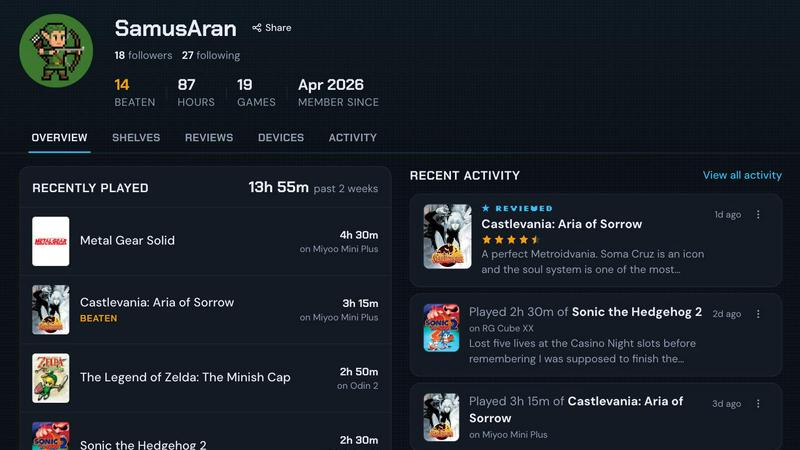
About retroshelf
retroshelf is an innovative play-tracking and discovery app specifically designed for retro handheld gaming enthusiasts. It provides users with a public shelf that showcases the games they are currently playing, have finished, are reviewing, and are replaying, all while maintaining device context. This means that instead of having to remember or keep track of notes across various platforms, spreadsheets, and even memory, users can easily access a comprehensive log of their gaming sessions. With retroshelf, every game you play is logged automatically through a tiny plugin that runs on your handheld device, capturing essential details such as the game title, playtime, and the specific handheld used. This creates a browsable history of gaming sessions, enabling players to reflect on their gaming journey and connect with others in the community. The platform turns scattered sessions across multiple handhelds into a cohesive timeline that users can browse later, showing what they played, where they played it, what they finished, and the notes they left along the way. retroshelf is currently in a closed beta phase, opening in small waves to retro handheld players who want to help shape the community from the beginning. The app is currently supported on muOS and OnionOS, with the simple setup process of dropping a plugin onto an SD card, linking the device, and having sessions log automatically.
Features of retroshelf
Automatic Session Logging
A tiny plugin runs on your handheld device and captures every gaming session automatically as you play. This plugin records the game title, the minutes played, and the specific handheld device used. Your shelf updates while you are still on the cushion, eliminating the need for manual note-taking or spreadsheet tracking.
Public Shelf with Device Context
retroshelf provides users with a public shelf that displays the games they are currently playing, have finished, are reviewing, and are replaying. Each entry maintains device context, meaning viewers can see exactly which handheld was used for each gaming session, adding valuable context to the gameplay experience.
Browsable Gaming Timeline
The platform turns scattered sessions across multiple handhelds into a cohesive timeline that users can browse later. This timeline shows what games you played, where you played them, what you finished, and the notes you left along the way, creating a comprehensive and searchable history of your gaming journey.
Community Discovery and Filtering
retroshelf allows users to find games through real shelves, seeing which games are catching on with handheld players and which devices they are playing them on. Users can filter shelves by device, including Miyoo, Anbernic, Odin, and other popular handhelds, and browse popular games this week to see what people are picking up, finishing, and replaying right now.
Reviews with Handheld Context
Star ratings on retroshelf come with the handheld they were played on, not just a number. This provides meaningful context for reviews, as users can see how a game performs and feels on a specific device before making their own purchasing or playing decisions.
Use Cases of retroshelf
Tracking Your Complete Gaming History
A retro handheld enthusiast owns multiple devices including a Miyoo Mini, an Anbernic RG35XX, and an Odin 2. With retroshelf, they can automatically log every session across all devices without manual effort. The plugin runs silently on each handheld, capturing game titles, playtime, and device information. Over time, they build a comprehensive timeline of their gaming journey, allowing them to look back and see which games they finished, which they dropped, and how their tastes evolved across different devices.
Discovering New Games Through Community Shelves
A player is looking for new games to play on their Anbernic device but is tired of generic recommendations. Using retroshelf, they browse the community discovery feature to see what other Anbernic owners are currently playing, finishing, and replaying. They filter shelves by device to find games specifically popular on their hardware. By reading reviews that include device context, they can see how games perform on similar hardware before committing to a playthrough.
Sharing Your Gaming Journey with Friends
A retro gaming enthusiast wants to share their current gaming rotation with friends who are also into handhelds. With retroshelf, their public shelf automatically updates as they play, showing friends exactly what games they are playing, on which devices, and for how long. Friends can see when they finish a game or start a replay, creating natural conversation starters and recommendations within the community.
Making Informed Game Purchases
A collector is considering purchasing a new retro handheld game but wants to know how it plays on their specific device model. They use retroshelf to find reviews from other players who have played the game on the same handheld. The reviews include device context, so they can see star ratings tied to the exact hardware they own. This helps them make informed purchasing decisions based on real gameplay experiences from the community.
Frequently Asked Questions
How does the automatic session logging work?
The automatic session logging works through a tiny plugin that you drop onto your handheld device's SD card. Once you link your device to your retroshelf account, the plugin runs silently in the background while you play. It captures essential details for each session including the game title, the minutes played, and the specific handheld device used. Your shelf updates automatically while you are still playing, creating a seamless and effortless tracking experience.
Which handheld devices and operating systems are supported?
retroshelf currently supports muOS and OnionOS on compatible retro handheld devices. The platform is designed to work with popular handheld brands including Miyoo, Anbernic, Odin, and other gear that retro enthusiasts care about. As the closed beta progresses and the community grows, support for additional operating systems and devices is expected to expand based on user feedback and demand.
Is retroshelf currently available to everyone?
retroshelf is currently in a closed beta phase. The team is opening the platform in small waves, starting with retro handheld players who want to help shape the community from the beginning. If you are interested in joining, you can sign up for the beta on the retroshelf website. Existing beta testers can sign in directly. This phased approach allows the team to refine the experience and build a strong foundation for the community.
Can I see what other people are playing on their handhelds?
Yes, community discovery is a core feature of retroshelf. You can browse games through real shelves, seeing which games are catching on with handheld players and which devices they are playing them on. The platform shows popular games this week, including what people are picking up, finishing, and replaying right now. You can also filter shelves by specific devices like Miyoo, Anbernic, or Odin, and read reviews that include the handheld context in which the game was played.
Explore more in this category:
Similar to retroshelf

A client-side developer tool suite with 1000+ utilities. Process data locally, nothing is sent to servers.

Free browser physics destruction game with 100 handcrafted levels. Aim a cannon, topple structures, trigger chain reactions, and clear every target.

PrettyScale offers free, private AI face analysis tools that run entirely in your browser with no uploads or account needed.

Burge Coffee is a free, no-account home roasting guide with tools, roaster maps, and stories for serious coffee lovers.

On Music AI transforms text, lyrics, or ideas into complete songs with vocals, beats, and instrumentals in minutes.

Bloom Plant ID uses AI to instantly identify plants, diagnose diseases, and send personalized care reminders for confident gardening.

HavenBook simplifies home maintenance with personalized tasks and reminders, ensuring your home stays in top shape and avoids costly repairs.

NinjaHackz is a portable CS2 cheat offering wallhacks, aim assist, and ESPs to give you effortless game control.