
RoomCreator
RoomCreator transforms your photos into stunning AI-designed spaces in seconds, making home design easy and accessible for everyone.
Visit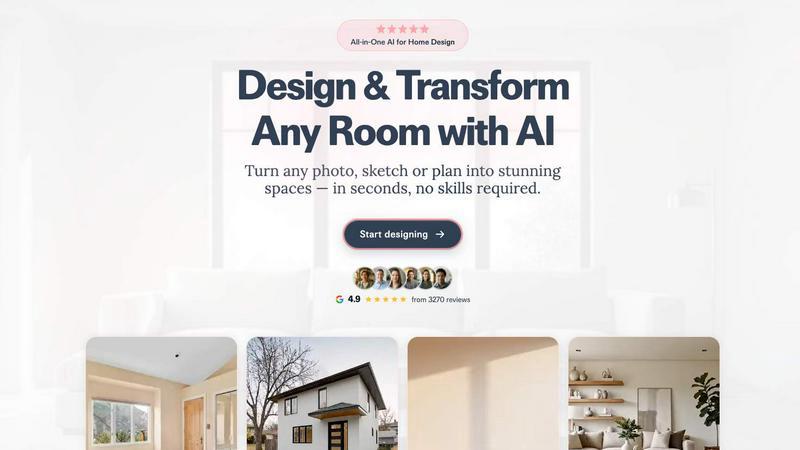
About RoomCreator
RoomCreator is an innovative AI-driven room design tool that empowers homeowners and DIY enthusiasts to visualize and transform their spaces effortlessly. By simply uploading a photo of any room—be it a kitchen, bedroom, living room, or even an exterior shot—users can receive stunning, photorealistic redesigns within just 10 seconds, without needing any design expertise. This platform is tailored for a diverse audience, including homeowners looking to renovate, real estate agents wanting to enhance listings, and individual investors seeking to maximize property value. With features that allow for smart layout adjustments, instant color changes, and realistic 3D previews, RoomCreator makes it easy to experiment with new styles and ideas before committing to any purchases. Whether you are planning a quick refresh or a complete makeover, RoomCreator provides the tools needed to turn your vision into reality swiftly, efficiently, and for free with an initial trial.
Features of RoomCreator
AI Room Design in 10 Seconds
RoomCreator's core feature allows users to upload a single photo and receive an AI-generated redesign in just 10 seconds. This rapid turnaround enables homeowners to visualize potential changes without lengthy planning or design processes.
Smart Layout Improvements
The tool offers intelligent layout suggestions that enhance the flow and functionality of any space. Users can see how rearranging furniture and modifying layouts can lead to a more efficient and aesthetically pleasing environment.
Instant Color and Material Changes
Users can instantly experiment with different wall colors, flooring options, and furniture arrangements. This feature allows for quick iterations on design ideas, making it easier to make informed decisions before any purchases are made.
Realistic 3D Previews
RoomCreator provides high-quality 3D visualizations that incorporate natural lighting, giving users an accurate representation of how their redesigned space will look. This immersive experience helps in making confident design choices.
Use Cases of RoomCreator
Homeowners Planning Renovations
Homeowners can utilize RoomCreator to visualize their spaces before starting renovations or redecorating projects. By seeing their rooms in various styles and configurations, they can make informed decisions that suit their tastes and needs.
Real Estate Agents Enhancing Listings
Real estate agents can leverage RoomCreator to create stunning visuals for property listings. By transforming outdated or empty rooms into beautifully staged interiors, agents can attract potential buyers and stand out in a competitive market.
Individual Investors Evaluating Properties
Investors looking to flip or rent properties can use the platform to assess the renovation potential of spaces. By generating realistic visuals, they can showcase the future value of a property to potential buyers or investors.
Designers and DIY Enthusiasts Testing Ideas
Designers, including DIY enthusiasts, can use RoomCreator to test various design concepts quickly. Whether it’s experimenting with different decor styles or layout changes, the tool allows for creative exploration without significant time or financial investment.
Frequently Asked Questions
How does RoomCreator work?
RoomCreator operates by allowing users to upload a photo of their space. The AI then processes the image and generates a redesigned version, complete with new layouts, colors, and furniture arrangements within seconds.
Is there a cost to use RoomCreator?
Users can try RoomCreator for free with 10 initial credits. After that, users may need to explore pricing options for additional credits or features based on their design needs.
Can I use RoomCreator for outdoor spaces?
Yes, RoomCreator includes features to visualize exterior designs, allowing users to experiment with paint colors, landscaping, and other outdoor elements to enhance curb appeal.
Do I need design skills to use RoomCreator?
No, RoomCreator is designed for everyone, regardless of design experience. Its intuitive interface and AI-driven features make it easy for anyone to create beautiful room designs quickly.
Similar to RoomCreator

Apps and files on an infinite canvas where people and AI agents work together.

AI hiring platform to screen resumes, run 10-language voice interviews, and rank top talent automatically.

SendNow helps teams securely share sensitive files, track engagement, and manage branded deal rooms. Control downloads, expiration, and viewer access.

From first scene to published 2D game, no code

Free Online Screen Test Tool - Instantly diagnose dead pixels, lines, color issues, and flickering. Multiple test modes, no download needed.

Free online PDF tools to merge, compress, convert, edit, sign, and manage documents—no signup, watermarks, or daily limits.

Anonymous Instagram story and profile viewer for private browsing.

iHatePDF is a free suite of 35+ professional PDF tools, all simplified in a place. Built with ❤️ for the people who hate slow PDF platforms.