
SeeCalc
SeeCalc provides free, instant, client-side calculators for marketing, health, construction, and finance with transparent step-by-step formulas.
Visit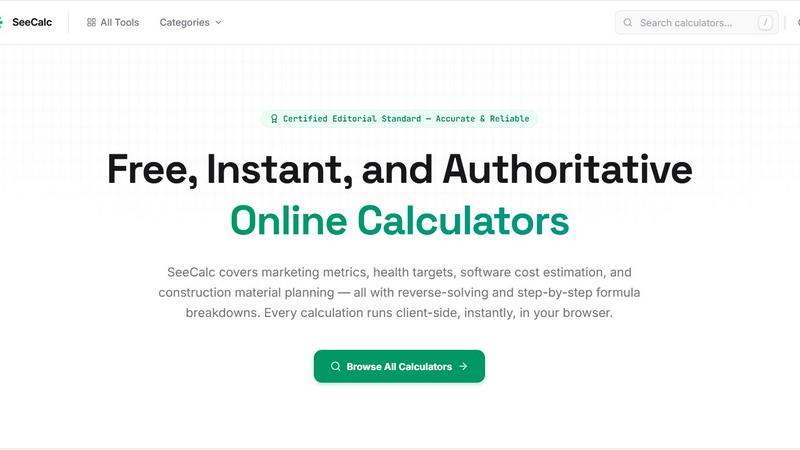
About SeeCalc
SeeCalc is a comprehensive, free online calculator platform built and maintained by a single developer who is passionate about making marketing math and other domain specific calculations fast, transparent, and accessible to everyone. The platform hosts over 56 free calculators spanning 12 specialist domains, including marketing metrics, health targets, software cost estimation, construction material planning, finance, logistics, and more. Every calculation runs entirely client side in the user's browser, ensuring 100% privacy as no data is ever sent to a server. SeeCalc distinguishes itself by offering two to four solving modes per tool, allowing users to not only compute a result from known inputs but also reverse solve for any unknown variable in a formula. Each calculator provides a clear step by step formula breakdown, enabling users to understand exactly how the result was derived. The platform is designed for a wide audience, including marketing professionals, health enthusiasts, software developers, construction planners, electricians, logistics specialists, and anyone needing quick, authoritative, and transparent calculations. With a certified editorial standard ensuring accuracy and reliability, SeeCalc serves as a trusted resource for both quick estimates and detailed planning. The platform is organized into dedicated category hubs, each containing industry standard formulas, worked examples, and frequently asked questions, making it easy for users to find the specific tool they need and learn the underlying principles.
Features of SeeCalc
Client Side Privacy and Instant Results
Every calculation on SeeCalc runs entirely within the user's browser using client side JavaScript. This architecture ensures that no data, whether it is a marketing budget, health metric, or financial figure, is ever transmitted to a server or stored externally. Users receive instant results without any page reloads or network latency, providing a seamless and secure experience. This privacy first approach is critical for professionals handling sensitive data and for users who value their digital privacy.
Reverse Solving and Multiple Solving Modes
Each calculator on SeeCalc is equipped with two to four distinct solving modes. Beyond the standard forward calculation where users input known values to get a result, the tools allow for reverse solving. For example, a marketing calculator can compute CPM from ad spend and impressions, but it can also reverse solve to find the required ad spend given a target CPM and impression count. This flexibility empowers users to work backwards from a desired outcome to determine the necessary inputs, making the tools invaluable for planning and optimization.
Step by Step Formula Breakdowns
Transparency is a core principle of SeeCalc. After performing a calculation, the platform displays a complete, step by step breakdown of the formula used. Users can see each intermediate value and the exact arithmetic operations performed to arrive at the final result. This educational feature demystifies complex formulas, helps users verify the accuracy of the calculation, and teaches them the underlying mathematical principles so they can apply them independently in the future.
Comprehensive Domain Hubs with Worked Examples
SeeCalc organizes its 56 plus calculators into 12 specialist domain hubs, such as Marketing, Health, Finance, and Construction. Each hub is a dedicated resource page that contains not only the relevant calculators but also the industry standard formulas, detailed worked examples, and a curated set of frequently asked questions. This structure allows users to explore an entire domain deeply, understand the context of each formula, and see practical applications before using the tools themselves.
Use Cases of SeeCalc
Campaign Budget Planning and Media Buying
A marketing manager planning a digital advertising campaign can use the Marketing Calculators hub to determine the optimal budget allocation. By using the CPM calculator, they can input a target CPM and desired impressions to find the required ad spend. Alternatively, they can reverse solve using a fixed budget to see how many impressions they can afford. The CPA and ROI calculators allow for deeper analysis of campaign profitability, all with instant, private calculations.
Personal Health and Hydration Goal Setting
An individual looking to improve their daily hydration can use the Water Intake Calculator in the Health hub. By entering their body weight, the calculator applies the clinically recognized formula of 0.67 fluid ounces per pound to output a personalized daily water target in fluid ounces, liters, milliliters, and glasses. The step by step breakdown shows exactly how the target is derived, and the multiple solving modes allow the user to adjust for activity level or other factors.
Software Project Cost Estimation
A startup founder or project manager can use the Dev Cost Calculators to estimate the budget for a new mobile app or website. By entering the estimated development hours and hourly rate, the calculator applies the standard cost formula that includes a buffer for contingencies. The tool can also reverse solve to find the maximum number of features or hours that fit within a fixed budget, enabling informed decision making during the planning phase.
Construction Material Planning for Masonry Projects
A contractor or DIY homeowner planning a brick wall can use the Construction Calculators to determine the exact number of bricks needed and the total material cost. By inputting the wall dimensions and brick size, the calculator instantly computes the wall coverage area and brick count. The step by step breakdown explains the formula for calculating area and accounting for mortar joints, ensuring accurate material ordering and reducing waste.
Frequently Asked Questions
Are my calculations private and secure on SeeCalc?
Yes, absolutely. All calculations on SeeCalc are performed client side within your browser using JavaScript. No data, including any numbers you input, is ever sent to a server, stored, or shared with any third party. Your privacy is guaranteed, and you can use the tools with complete confidence, even when working with sensitive financial or health information.
What does reverse solving mean in the context of SeeCalc calculators?
Reverse solving means that instead of only calculating a result from known inputs, you can also input a desired result and solve for any unknown variable in the formula. For example, in the CPM calculator, you can enter a target CPM and your budget to find out how many impressions you can achieve. This feature is available in two to four solving modes per tool and is designed for planning and optimization.
How does SeeCalc ensure the accuracy and reliability of its formulas?
SeeCalc adheres to a certified editorial standard that ensures all formulas and calculations are accurate and reliable. Each calculator is built using industry standard formulas and is tested against known values. The step by step breakdown feature allows users to verify every intermediate step, providing full transparency and confidence in the results. The platform is maintained by a single dedicated developer who continuously updates and validates the tools.
Is SeeCalc completely free to use with no hidden fees or limits?
Yes, SeeCalc is completely free to use. There are no subscription fees, no paywalls, and no limits on the number of calculations you can perform. The platform is built and maintained by a single developer who is passionate about making these tools accessible to everyone. All 56 plus calculators across 12 domains are available instantly without any registration or account creation.
Explore more in this category:
Similar to SeeCalc


Free online PDF tools to merge, compress, convert, edit, sign, and manage documents—no signup, watermarks, or daily limits.

Free online tools for tax forms, invoices, and business paperwork for freelancers, contractors, LLCs, and small businesses.

privacy-first, AI-powered contact management platform

SnapPChart grades a trading chart screenshot A+ to F, with an entry, stop, targets, and risk/reward. Works on stocks, forex, crypto, futures.


TheCalcoloIVA.com helps Italian partite IVA, freelancers, and small businesses calculate VAT, understand tax rules, and stay compliant.