
Square Face Generator
Square Face Generator is a free browser-based tool for creating cute square avatar icons by mixing face parts and colors with no login required.
Visit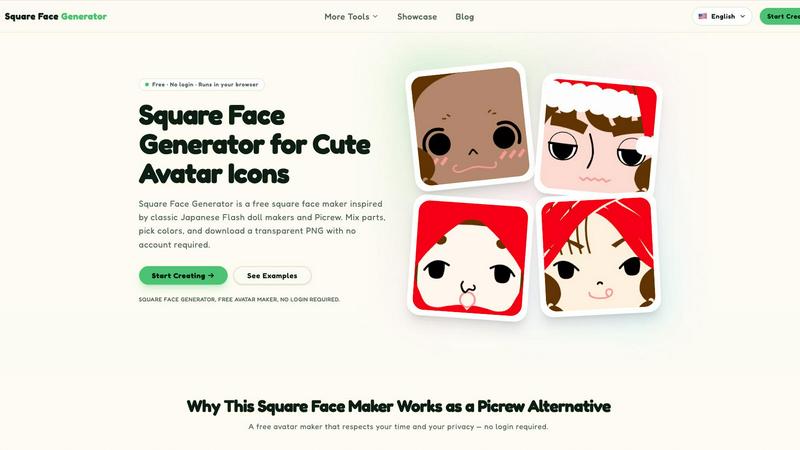
About Square Face Generator
Square Face Generator is a free, browser-based avatar creation tool that specializes in generating charming, square-shaped character faces. Inspired by the popular Japanese Picrew and classic Flash doll maker traditions, this tool offers a comprehensive and intuitive experience for anyone looking to create unique, customizable avatar icons. With over 200 individual parts spread across 12 distinct categories, users can mix and match skin tones, bangs, side hair, eyes, noses, mouths, eyebrows, eyelashes, blush, glasses, hats, and outfits to assemble millions of unique combinations. The tool is designed to be accessible to everyone, requiring no login, no account creation, and no payment to use any of its features. A primary value proposition is its strong focus on user privacy and data security; all rendering and processing happens locally within the user's browser, meaning no image data or personal information ever leaves the device. This makes it an ideal solution for privacy-conscious individuals. The interface is fully responsive and touch-friendly, ensuring a seamless and enjoyable experience whether the user is on a desktop computer, a tablet, or a smartphone. The final product is a transparent 256x256 pixel PNG file that can be downloaded instantly with a single click, making it perfect for use as a profile picture, a game asset, or a creative project element. Square Face Generator is a powerful, simple, and private alternative to other avatar makers, offering a fun and engaging way to express personality through a cute, square-faced character.
Features of Square Face Generator
Comprehensive Customization Library
The tool provides access to over 200 unique pieces organized into 12 distinct categories, including skin tones, bangs, side hair, eyes, nose, mouth, brows, lashes, blush, glasses, hats, and outfits. This extensive library allows for the creation of millions of possible combinations, ensuring that every avatar can be truly unique and personalized to the user's specific taste.
Local Browser-Based Rendering
All image rendering and processing occurs directly within the user's web browser. This means that no image data, personal information, or created avatars are ever uploaded to an external server. This feature provides a significant privacy advantage, ensuring that users can create and experiment with their designs with complete peace of mind regarding their data security.
Instant Transparent PNG Export
Users can download their finished avatar with a single click. The tool exports a transparent 256x256 pixel PNG file that is perfectly optimized for use as a profile picture across various social media platforms, forums, and messaging apps. This instant download feature eliminates any waiting time or complicated export procedures.
Intuitive and Mobile-Responsive Interface
The interface is designed to be user-friendly and accessible, with no tutorials or learning curves required. It features a live preview that updates in real-time as users make selections. The tool is fully responsive and touch-friendly, functioning flawlessly on desktop computers, tablets, and smartphones, making avatar creation possible from any device.
Use Cases of Square Face Generator
Creating Unique Social Media Profile Pictures
The tool is perfectly suited for generating custom profile pictures for platforms like Discord, X/Twitter, Instagram, and TikTok. Users can create a distinctive and personal avatar that stands out from generic images, allowing for a unique expression of identity without needing to use a personal photograph. The transparent background ensures the icon fits seamlessly into any platform's circular or square frame.
Designing Assets for Indie Game Development
Indie game developers can use this tool to quickly generate non-player character (NPC) portraits and player avatar placeholders. The square format and charming art style are ideal for many types of 2D games. This saves significant development time and resources, providing a library of ready-to-use assets that can be easily integrated into a game's user interface or character selection screen.
Establishing Unified Team or Community Identities
For online communities, guilds, clubs, or school classes, this tool offers a way to create a cohesive yet personalized set of avatars. Members can create their own unique character using the same core style, fostering a sense of unity and belonging while still allowing for individual expression. This is particularly useful for creating a consistent visual identity for a group across different platforms.
Supporting Creative and Educational Projects
The generated avatars can be used in a wide variety of creative projects, including slideshow presentations, digital posters, stickers, school assignments, or personal zines. The clean, cute art style and transparent background make them versatile assets that can be easily incorporated into different digital documents and creative works without requiring advanced graphic design skills.
Frequently Asked Questions
Is it really free to use all features?
Yes, Square Face Generator is 100% free to use. There are no paywalls, no hidden costs, and no watermarks on the final exported images. Every single part, color option, and the download function are available to all users without any payment or subscription.
What size and format are the exported images?
The tool exports your finished avatar as a transparent PNG file with a resolution of 256x256 pixels. This size is standard and optimized for use as a profile picture on most social media platforms, forums, and messaging applications.
Do I need to install any software to use this tool?
No installation is required. Square Face Generator runs entirely within your web browser. It is powered by a technology called Ruffle, which allows it to run without the need for a separate Flash plugin. You simply visit the website and start creating immediately.
Can I use my created icons for commercial purposes?
The tool is designed for personal and creative use. For specific details regarding commercial usage rights, it is recommended to review the official Terms of Service and legal documentation provided on the Square Face Generator website to understand the full scope of permissible use for the generated assets.
Explore more in this category:
Similar to Square Face Generator

Create AI videos from text or images with Dola AI. Free starter credits, multiple video models, instant downloads, plus AI image generation.

Create and edit AI images, generate videos, and compare models in one creative workbench.

AI-powered image text editor to edit, replace, fix, or translate text in images while preserving the original font, color, size, and style.

Paste a URL and AI designs on-brand Open Graph images from your page's colours, fonts and logo. Free, no sign-up.

Free AI clothes changer online. Swap outfits and try on clothes from a photo in minutes — create a free account to start, no card required.

Free AI video generator: turn text prompts and photos into video clips with Sora 2, Veo 3.1, Wan and more. Free starter credits, no watermark download

AI pet image generator with photo-to-pet and free credits

Discover 50,000+ ready-to-use AI prompts for text, image, and video generation. Save time and create better results with AI.