
LoadTester
LoadTester is a modern HTTP and API load testing tool that lets engineering teams run distributed performance tests from a browser or CI/CD pipeline.
Visit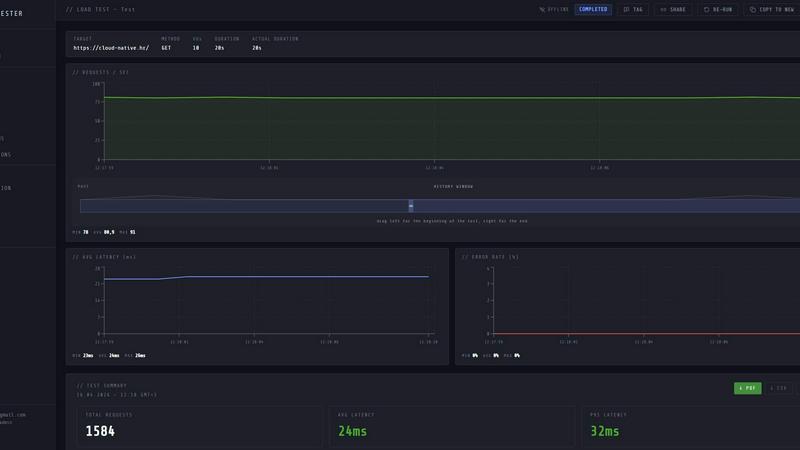
About LoadTester
LoadTester is a modern, cloud-native HTTP and API load testing tool designed by Cloud Native d.o.o. to eliminate the operational overhead traditionally associated with performance testing. It enables engineering teams to run distributed load tests directly from their browser or integrate them seamlessly into CI/CD pipelines, all without provisioning, configuring, or managing any underlying infrastructure. The core value proposition is simplicity and speed: a test can be created, launched, and begin generating live analytics in under three seconds. LoadTester is built for developers, QA engineers, SREs, and platform teams who need repeatable, reliable performance checks as part of their development workflow. It supports both virtual user (VU) mode and requests-per-second (RPS) mode, allowing users to model realistic traffic patterns or stress endpoints with precise throughput targets. During a live run, the console streams key metrics including throughput (RPS), latency percentiles (P50, P95, P99), error counts, and active worker distribution, updating in real time. After a test completes, LoadTester provides a clean, shareable result summary with total requests, average latency, data sent and received, and the option to export as PDF, CSV, or JSON. The platform also includes robust capabilities for setting pass/fail thresholds, scheduling recurring baseline tests, comparing runs to detect performance regressions, and integrating with Slack, email, and webhooks for automated alerting. With a free plan available and support for up to 10,000 virtual users and 10,000 requests per second, LoadTester is built for teams that want to ship with confidence and prove capacity before launch.
Features of LoadTester
Instant Distributed Execution
LoadTester eliminates the need for any infrastructure setup or worker orchestration. When a user launches a test, the platform automatically dispatches distributed workers and begins executing requests in under three seconds from cold start. There is no queue time, no manual scaling, and no scheduling headaches. The system handles worker coordination, scaling, and execution flow transparently, allowing teams to focus entirely on analyzing results rather than managing test infrastructure. This feature is critical for teams that need to run frequent, ad-hoc performance checks without operational friction.
Live Real-Time Analytics
During a test run, LoadTester streams live telemetry data directly to the browser console. Users can watch key metrics update in real time, including current requests per second (RPS), active virtual users (VUs), latency percentiles (P50, P95, P99), and error counts. A dynamic latency distribution chart shows how response times evolve over the last 60 seconds, making it easy to spot performance degradation as it happens. This live visibility enables immediate decision-making, such as pausing or stopping a test if anomalies appear, rather than waiting for a post-run report to identify issues.
Smart Auto-Stop with Thresholds
LoadTester allows users to define performance guardrails before or during a test run. Users can set custom thresholds for P95 latency, error rate, or regression compared to a previous baseline. When a threshold is breached, the system can automatically stop the test to prevent wasted resources or further impact on the target system. This feature is particularly valuable for CI/CD pipelines where tests must pass or fail automatically based on predefined criteria, enabling teams to catch regressions before they reach production.
CI/CD Integration and Automated Workflows
LoadTester is built for automation. It provides a full API, webhook support, and direct integration with CI/CD platforms. Tests can be scheduled to run at specific times (e.g., nightly release gates) or triggered automatically on every deploy. Results can be posted to Slack channels, sent via email, or forwarded via webhook to release bots and monitoring dashboards. This automation ensures that performance testing becomes a seamless, repeatable part of the software delivery lifecycle, catching regressions early and providing consistent data for capacity planning.
Use Cases of LoadTester
Pre-Release Performance Validation
Before deploying a new feature or a major update, engineering teams can run a load test against staging or production endpoints to validate that the application handles expected traffic without degradation. By setting specific latency and error rate thresholds, teams can gate the release process: if the test fails, the deployment is automatically blocked. This use case ensures that performance regressions are caught and addressed before they impact end users, maintaining a high quality of service.
Capacity Planning and Spike Testing
LoadTester enables teams to simulate high-traffic events such as product launches, marketing campaigns, or seasonal spikes. By configuring a test with a high number of virtual users or a specific RPS target, teams can observe how their infrastructure behaves under stress. The live analytics and post-run reports provide concrete data on throughput limits, bottleneck identification, and resource utilization. This information is essential for making informed decisions about scaling infrastructure and optimizing application performance.
Continuous Integration Performance Gates
Integrating LoadTester into a CI/CD pipeline allows teams to run performance tests automatically with every code commit or pull request. A baseline performance profile is established, and subsequent runs are compared against it. If the P95 latency increases by more than a defined percentage (e.g., 15%), the test fails, alerting the team immediately. This use case shifts performance testing left in the development process, making it a standard part of the development workflow rather than an afterthought.
Scheduled Baseline and Regression Monitoring
Teams can schedule recurring load tests to run daily, weekly, or at any interval to monitor the performance of critical endpoints over time. These scheduled tests establish a performance baseline and automatically compare each new run against historical data. If a regression is detected, LoadTester can trigger alerts via Slack or email. This use case is ideal for production monitoring of API endpoints, ensuring that performance does not degrade silently due to code changes, configuration updates, or infrastructure shifts.
Frequently Asked Questions
How is LoadTester different from traditional load testing tools like Apache JMeter or Locust?
LoadTester is a fully managed, cloud-native service that eliminates the need to set up, configure, and maintain any testing infrastructure. Traditional tools require users to provision servers, install software, manage distributed worker coordination, and handle result storage. LoadTester handles all of this automatically, providing instant execution from a browser or API. It also offers built-in features like live streaming analytics, threshold-based auto-stop, run-to-run comparison, and CI/CD integration out of the box, which typically require significant custom scripting with traditional tools.
What types of tests can I run with LoadTester?
LoadTester supports HTTP and API load testing for any HTTP method including GET, POST, PUT, and DELETE. You can run tests in two modes: Virtual Users (VUs) which simulate concurrent user sessions with think times, and Requests Per Second (RPS) which maintain a constant throughput rate. This flexibility allows you to model realistic user behavior or stress test specific endpoints with precise traffic patterns. The platform supports up to 10,000 VUs and 10,000 RPS per test.
Can I integrate LoadTester with my existing CI/CD pipeline?
Yes, LoadTester is designed for seamless CI/CD integration. It provides a comprehensive API for triggering tests programmatically, retrieving results, and setting pass/fail thresholds. Tests can be included in any CI/CD pipeline script. Additionally, LoadTester supports webhooks for sending test completion notifications to external systems, Slack integration for real-time alerts, and email notifications for scheduled reports. This makes it easy to automate performance checks as part of your deployment workflow.
Is there a free plan available and what are the limitations?
Yes, LoadTester offers a free plan that allows teams to start testing immediately without any upfront cost. The free plan includes access to the core testing features, live analytics, and basic reporting. Specific limitations on the free plan, such as the number of test runs per month, concurrent test slots, or data retention period, are detailed on the pricing page. For teams requiring higher throughput limits, longer test durations, advanced scheduling, or dedicated support, paid plans are available that scale with usage.
Pricing of LoadTester
LoadTester offers a tiered pricing model designed to accommodate teams of all sizes. A free plan is available for getting started with basic load testing. Paid plans provide higher limits on virtual users, requests per second, test duration, and include advanced features such as scheduled tests, API access, and priority support. Specific pricing details, including plan names, feature breakdowns, and monthly or annual costs, are available on the official LoadTester pricing page. For enterprise teams with custom requirements, volume discounts and dedicated support options are also available.
Similar to LoadTester

ToolVerified is a hand-curated directory for discovering the best new software. We ban paid ads so you can find apps ranked purely by user upvotes.


CachePlex is an all-in-one suite of 22+ professional web tools. From SEO audits and image compression to AI writing, get everything in one free place.

StackLedge is a manually curated discovery engine for founders and developers. We filter out the SEO spam and focus exclusively on high-value tooling

BugShield fixes WordPress bugs and keeps your site maintained with monitoring, backups, updates, and expert support when something goes wrong.


A client-side developer tool suite with 1000+ utilities. Process data locally, nothing is sent to servers.
